CISCO IE4000 Introduction
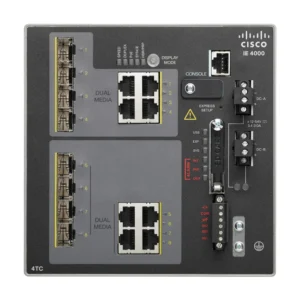
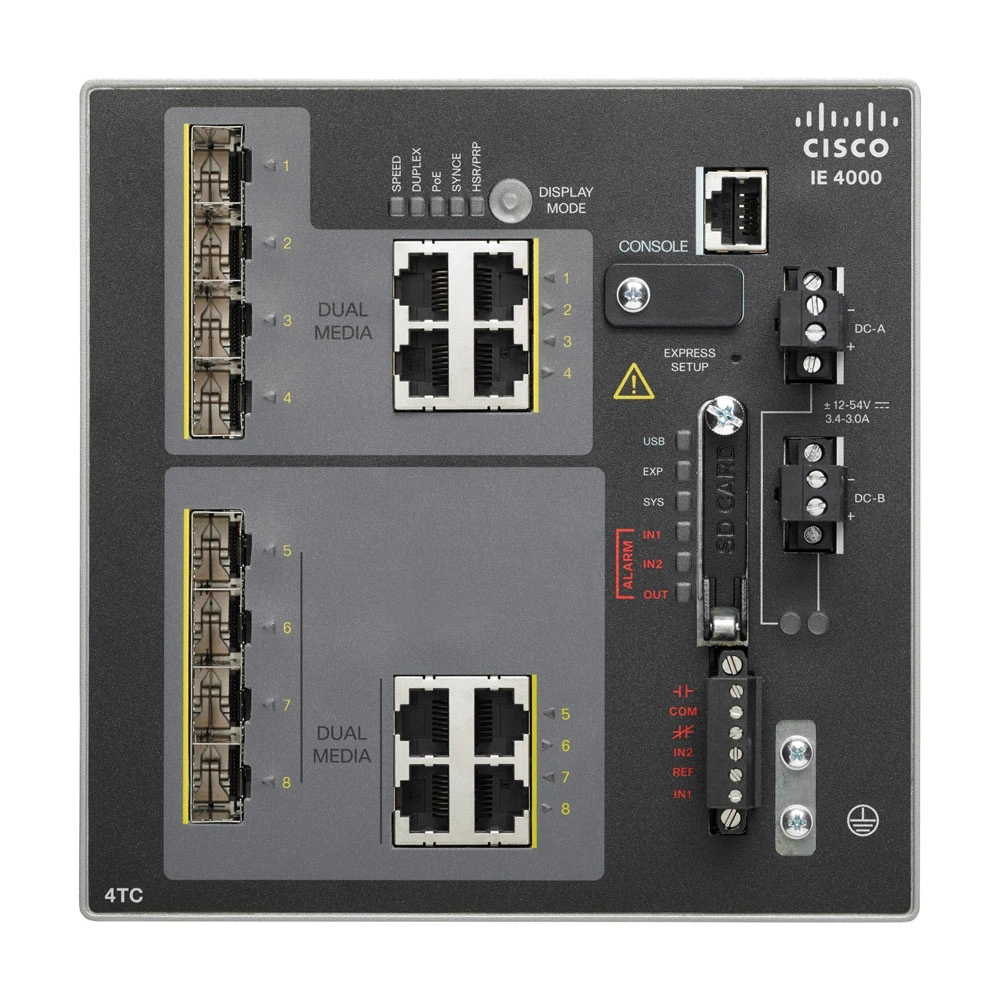
The Cisco Industrial Ethernet (IE) 4000 family is a compact, DIN-rail mountable, hardened switch portfolio designed to extend enterprise-grade switching into harsh industrial environments (manufacturing, energy/substation, transportation, smart cities). The series brings full Cisco IOS feature parity for L2 (and optional L3) features, industrial protocols (PROFINET, EtherNet/IP, Modbus TCP), built-in resiliency (REP, MRP, HSR, PRP), and a mix of copper, fiber (SFP), and PoE/PoE+ options in a small footprint. The official Cisco datasheet is the source of the platform capabilities and the specific model breakdown used below. IE 4000 Cisco Datasheet
What makes IE-4000 attractive
Hardened for industrial use: extended temperature ranges, vibration/shock immunity, surge and EMC compliance for substations/rail/marine. – IE 4000 Cisco Datasheet
Compact DIN-rail form factor with 4 × 1-Gigabit combo uplinks (SFP or RJ-45) across all models for resilient aggregation and ring topologies. IE 4000 Cisco Datasheet
Hardware capabilities: line-rate forwarding for all ports, 20 Gbps non-blocking switching capacity on larger models, 16k MAC table, up to 1,000 VLANs, embedded SW image verification and SwapDrive for zero-config replacement. IE4000 Cisco Datasheet
PoE/PoE+ support on selected models with practical power budgets (some models support up to 240 W total PoE budget; others have 125 W). Power provisioning depends on chosen external DIN rail power supply and the switch variant — pay attention to power-supply rating and temperature derating. Cisco Datasheet IE4000
Important lifecycle note: Cisco announced End-of-Sale/End-of-Life for the IE-4000 series; Cisco recommends newer rugged Catalyst models (IE3300/IE3400) as replacements. Check Cisco for current EoL dates and replacement suggestions before planning new purchases. Cisco IE4000 EOL / Cisco IE4000 EOS Notice
Understanding the IE4000 nomenclature
Cisco’s IE-4000 model names are compact but descriptive:
T = RJ-45 copper Fast-Ethernet (10/100), GT/GS = Gigabit RJ-45 copper
S = SFP fiber (often Fast-Ethernet SFP or Gigabit SFP depending on model)
P or GP = PoE/PoE+ capable ports and indicates PoE power support for those RJ-45 ports,
The trailing 4G in these models means the device includes 4 × 1G combo uplinks (SFP or RJ-45).
(Example: IE-4000-4GS8GP4G-E→ 4 × GE SFP + 8 × GE PoE RJ-45 + 4 × 1G combo uplinks). See below for a list of PoE/PoE+ Models in IE4000 series (ref. cisco ie4000 poe)
IE-4000-4T4P4G-E – 4 FE, 125W
IE-4000-4S8P4G-E – 8 FE, 125W
IE-4000-4GC4GP4G-E – 4 GE, 125W
IE-4000-8GT8GP4G-E – 8 GE, 240W
IE-4000-4GS8GP4G-E – 8 GE, 125W
Model comparison table
Below is a condensed comparison based on Cisco’s Table 2. “Total ports” is the total front-panel count (including the 4 combo uplinks). PoE budgets are the maximum platform PoE/PoE+ budgets published per model. For full electrical, environmental and mechanical details consult the Cisco datasheet and hardware installation guide. Cisco
| Model | Total ports (front) | Front port makeup (non-uplinks) | 4 × GE combo uplinks | PoE / PoE+ ports | Published max PoE budget |
|---|---|---|---|---|---|
| IE-4000-4TC4G-E | 8 | 4 × FE combo (SFP/RJ-45) + 4 × 1G combo (these are the non-uplink combo counts) | 4 × 1G combo (all models) | — | — (non-PoE model) (Cisco) |
| IE-4000-8T4G-E | 12 | 8 × FE RJ-45 | 4 × 1G combo | — | — (non-PoE) (Cisco) |
| IE-4000-8S4G-E | 12 | 8 × FE SFP | 4 × 1G combo | — | — (non-PoE) (Cisco) |
| IE-4000-4T4P4G-E | 12 | 4 × FE RJ-45 + 4 × FE PoE RJ-45 | 4 × 1G combo | 4 PoE ports (Fast-Ethernet PoE) | 125 W (model listed alongside 4 FE PoE, Cisco table marks 125W). (Cisco) |
| IE-4000-16T4G-E | 20 | 16 × FE RJ-45 | 4 × 1G combo | — | — (non-PoE) (Cisco) |
| IE-4000-4S8P4G-E | 16 | 4 × FE SFP + 8 × FE PoE RJ-45 | 4 × 1G combo | 8 FE PoE ports | 125 W published. (Cisco) |
| IE-4000-8GT4G-E | 12 | 8 × GE RJ-45 | 4 × 1G combo | — | — (non-PoE) (Cisco) |
| IE-4000-8GS4G-E | 12 | 8 × GE SFP | 4 × 1G combo | — | — (non-PoE) (Cisco) |
| IE-4000-4GC4GP4G-E | 12 | 4 × GE SFP + 4 × GE PoE RJ-45 | 4 × 1G combo | 4 GE PoE ports | 125 W published. (Cisco) |
| IE-4000-16GT4G-E | 20 | 16 × GE RJ-45 | 4 × 1G combo | — | — (non-PoE) (Cisco) |
| IE-4000-8GT8GP4G-E | 20 | 8 × GE RJ-45 + 8 × GE PoE RJ-45 | 4 × 1G combo | 8 GE PoE ports | 240 W published (highest PoE budget in family). Note: temperature derating and power-supply limits apply. (Cisco) |
| IE-4000-4GS8GP4G-E | 16 | 4 × GE SFP + 8 × GE PoE RJ-45 | 4 × 1G combo | 8 GE PoE ports | 125 W published (some sources list both 125W and platform variants; check Cisco table for exact SKU variant). (Cisco) |
Table notes & caveats
1. The Cisco table defines combo ports that contain both an SFP and an RJ-45; only one of the pair may be active at a time. Cisco IE4000 Datasheet
2. FE = Fast-Ethernet (10/100), “GE” = Gigabit (10/100/1000). The IE-4000 family includes both FE and GE variants. Cisco
3. PoE budgets shown are maximum published values; the usable PoE depends on the installed external DIN-rail power supply (Cisco supplies 50 W, 65 W, 170 W options) and temperature derating. For example, the 8GT8GP variant supports up to 240 W but full 240 W may require a 170 W (or larger) external PSU and attention to ambient temperature. Always validate with the Hardware Installation Guide. Cisco IE 4000 Hardware Installation Guide
Practical selection guidance (how to choose between the models)
Need PoE for cameras / APs / phones? If your deployment needs multiple 1 Gbit PoE+ devices (surveillance cameras or Wi-Fi 6 APs), pick one of the GE PoE models: IE-4000-8GT8GP4G-E (8×PoE GE, 240 W) or IE-4000-4GS8GP4G-E / IE-4000-4GC4GP4G-E (8 or 4 GE PoE, 125 W). The 8GT8GP is the highest PoE budget option. Remember to size the external DIN-rail power supply accordingly. Cisco
Many small FE devices at the edge? Models with Fast-Ethernet ports (the T / S FE models) are cost-efficient for large numbers of low-bandwidth sensors or I/O islands (e.g., IE-4000-8T4G-E, IE-4000-16T4G-E). Cisco
Full Gigabit performance for aggregation or bandwidth-hungry devices? Choose GT/GS/GC variants (16GT, 8GT, 8GS, etc.) that offer 1 Gbit on access ports. These are better for modern IP cameras, edge compute nodes or uplink aggregation. Cisco
Fiber connectivity needs? Models with S (SFP) ports or combo ports give fiber reach options. Use S models where fiber connectivity to remote cabinets is required. Cisco
Environment & certification demands IE-4000s comply with heavy industrial standards (IEEE 1613, IEC 61850-3, EN50155 etc.); pick the IE-4000 family when you require certified substation/rail/utility compliance. Confirm the specific model’s certification matrix in Cisco’s datasheet. Cisco
Power & deployment tips (real-world operator advice)
Power supply sizing — don’t rely on the internal numbers alone: choose a DIN-rail power supply that provides the sum of the switch’s own power draw plus the maximum PoE budget you expect to draw (Cisco lists compatible power supplies and their ratings). If using PoE heavily, the PWR-IE170W options are typical. Also account for inrush and DC bus wiring. Cisco Datasheet
Temperature derating — high PoE output is subject to ambient temperature derating; the Hardware Installation Guide documents the derating curve and the maximum ambient at which full PoE is available. For 240 W models, full output to all PoE ports may only be available up to a specified temperature (often ~55°C), after which you must derate. Plan ventilation and enclosure selection accordingly. Cisco
Redundant power — the IE-4000 supports redundant DC inputs (9.6–60 VDC nominal) and redundant supplies. In critical industrial applications use redundant power feeds and UPS/battery where appropriate. Cisco
Resiliency & ring protocols — take advantage of REP/MRP/HSR/PRP for deterministic failover in control-plane sensitive deployments (PROFINET/industrial control). Test ring convergence times against application requirements. Cisco
Software, licensing and management
Substation/utility communications: select a certified variant with fiber uplinks and appropriate EMC spec. Cisco
Campus outdoor / street cabinets: use PoE models to feed APs or cameras directly and a ruggedized enclosure with a robust DIN rail PSU. Mind temperature derating. Cisco
Factory floor: FE based models for distributed I/O and GE models where cameras or edge compute need higher throughput. Use REP/MRP rings for fast failover. Cisco
Shortcomings and considerations for CISCO IE4000 Series
End-of-Sale / migration — Cisco has announced EoL for IE-4000 and recommends IE3300/IE3400 replacements. If this is a new deployment, evaluate newer Cisco rugged Catalyst models for longer support horizons. If you already run IE-4000s, plan lifecycle and spares strategy to account for EoL. Cisco
PoE expectations — maximum PoE budgets are model-dependent and constrained by external PSUs and temperature. Don’t oversubscribe PoE without testing. Cisco
Useful Links
Cisco Industrial Ethernet 4000 Series datasheet (model tables, features, power tables, compliance).
Cisco IE-4000 Hardware Installation Guide (PoE derating, installation considerations)
Cisco End-of-Sale / End-of-Life announcement for IE-4000 series.